Akeye · Sport

More time for the team. Less club admin.

Bring athletes, coaches, training sessions and team communication into one shared place, from the next practice to the whole season.

Let’s talk about your workflow

Clubs, teams & athletes

Akeye Sport · DemoSee your club in action.Explore a Sport demo workspace with teams, athletes and everyday activities.Take a tourOpens in a new tab

For sports clubs, coaches and the people who keep their teams running.

Real-world scenarios

See what Akeye can do.

From planning the training week to keeping medical records up to date: explore six moments from everyday club life.

Available actions follow your role, team or activity scope and enabled features. Messages and reminders have different recipients and delivery rules; no scenario guarantees that every parent receives an instant alert.

Training plans, ready in minutes

Before the week starts, the coach opens the calendar and prepares training sessions, matches, and team activities. Each event can be adjusted quickly, with notes, locations, or updates added when needed.

Coaches and team members with access can review the current schedule in one place. A shared plan makes it easier to prepare the week, while an update in the team conversation keeps families informed when something changes.

Explore this workflow
Coach planning a weekly training schedule in the app.
Scenario illustration, not an exact product screenshot. Depicted interface details are illustrative; the adjacent text describes supported behavior.

When the time changes, keep parents in the loop

Training moved by 15 minutes? The coach updates the session in Akeye and sends a clear message to the eligible team conversation, explaining the new time and anything players should bring.

The updated activity and the team message give families a clear place to check the new plan. Parents with access can read the details in context, while the coach keeps the change together with the team’s other practical updates.

Explore this workflow
Illustrated example of a parent reading an update about a changed training time.
Scenario illustration, not an exact product screenshot. Depicted interface details are illustrative; the adjacent text describes supported behavior.

Attendance without paper or guesswork

At training, the coach records completed participation and any lateness, adding a score or note when useful. Each observation stays attached to the athlete and session, making it easier to revisit what happened after practice.

The club gets a clearer overview of player activity, while the coach spends less time on administration after practice.

Explore this workflow
Coach marking player attendance for a training session.
Scenario illustration, not an exact product screenshot. Depicted interface details are illustrative; the adjacent text describes supported behavior.

Team communication in one place

The coach sends an important update to players, parents, or the whole team - for example when training starts, what to bring, or whether something has changed.

Messages stay together in the team or activity conversation that participants can access. Coaches and families can find the relevant update alongside the surrounding discussion, instead of piecing together information from separate channels.

Explore this workflow
Coach sending an update to players, parents, and the team.
Scenario illustration, not an exact product screenshot. Depicted interface details are illustrative; the adjacent text describes supported behavior.

Training insights beyond attendance

Club staff with the relevant analytics access can review available sport and activity views alongside recorded participation, lateness, scores and notes. The information gives the club a shared basis for discussing how training has been going.

Instead of relying only on memory or scattered notes, the team can look back at recorded observations and recognize patterns. Those insights support a more informed conversation about athletes who need attention and the next training cycle.

Explore this workflow
Illustrated club analytics workspace for reviewing recorded training and participation data.
Scenario illustration, not an exact product screenshot. Depicted interface details are illustrative; the adjacent text describes supported behavior.

Medical documents with expiry reminders

An authorized club user with Document access uploads an athlete’s medical certificate, links it to the athlete record and sets an expiry date. The club can keep the document and its renewal information together instead of searching through folders and messages.

A configured pre-expiration reminder reaches the active document creator and organization Admins in Akeye. They can review the record and request an updated certificate, helping the club keep important documentation current throughout the season.

Explore this workflow
Illustrated club user organizing an athlete’s medical certificate and document expiry date.
Scenario illustration, not an exact product screenshot. Depicted interface details are illustrative; the adjacent text describes supported behavior.

Inside Akeye

A closer look

Manual · SPORT
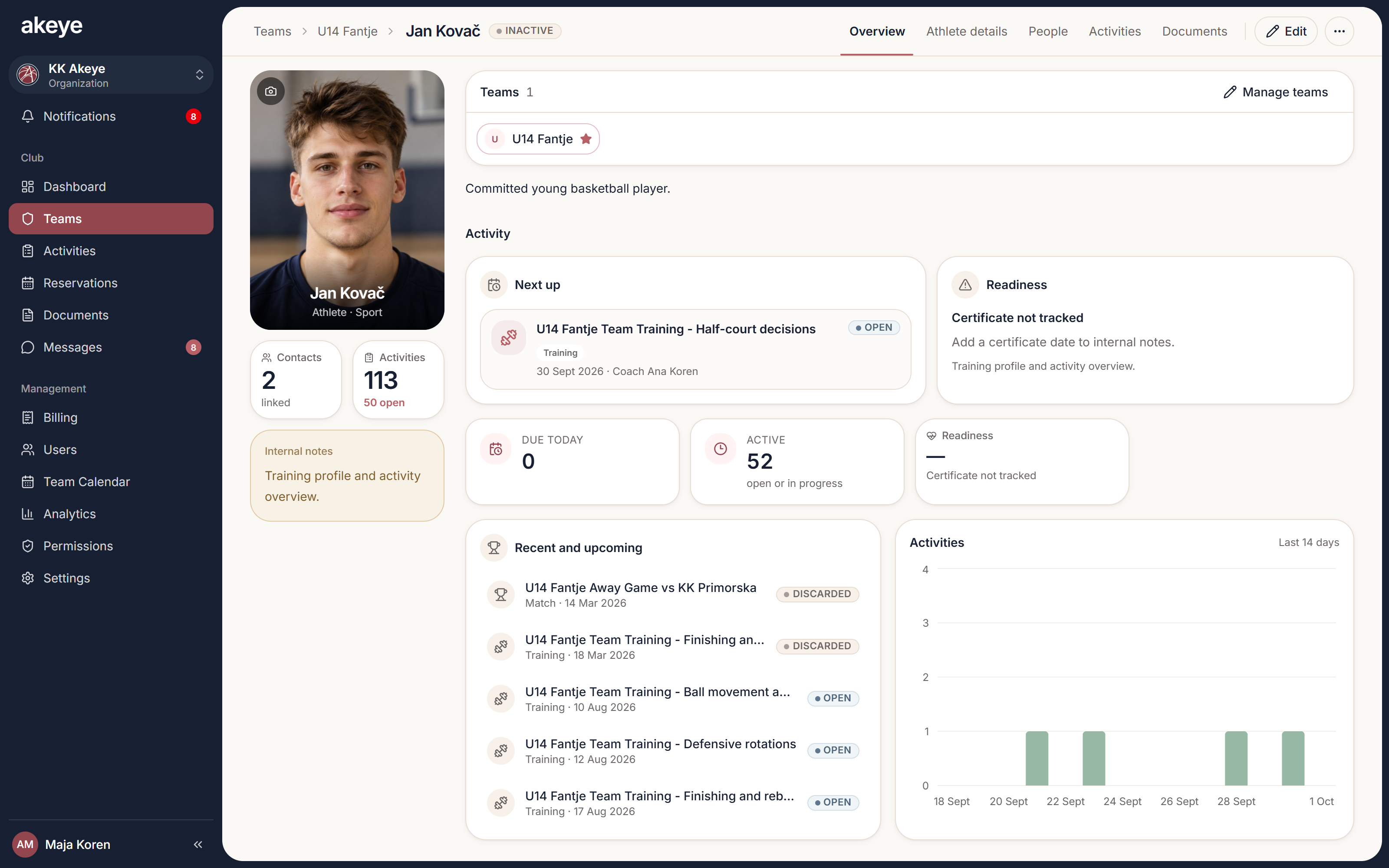
A real Akeye athlete overview: profile, team context and connected information.

The tools behind the workflow

  • Teams and athlete profiles
  • Training and activity calendars
  • Participation, scores and notes
  • Role-based access
  • Messaging and documents
  • iPhone and Android apps

Use cases

Explore focused workflows

Explore the details behind these real-world scenarios.

A few useful answers

Can a coach see everything in the club?

No. Access depends on the current role, permissions and team or activity scope. The Coach Manual explains the verified activity workflows.

Can we keep our own athlete information?

Yes. Administrators can configure supported custom fields for athlete information. Available features and capacity depend on your plan and organization setup.

How does Akeye organize clubs, teams and athletes?

Clubs can use Macro Units for team or club structures and Micro Units for athletes, then connect schedules, Activities, documents and the right user relationships to that structure.

Can coaches plan training and track attendance?

Yes. Coaches with the relevant activity access can plan training and record supported participation completion, late flags, scores and notes. Visibility and actions still follow the current role, activity scope and enabled features.

Can players and parents receive updates?

Eligible players and parents can receive athlete-added or athlete-removed notifications and messages in conversations they may access. A schedule edit alone does not guarantee an immediate notification to every parent; use an appropriate team message for a changed time.

Can clubs keep athlete documents and reminders together?

Yes. Athlete-related documents can be linked to the athlete record, and expiry information can support reminders for updated documents such as medical certificates.

Let’s start with your club.

Tell us about your teams, your season and the admin you would like to simplify. We’ll walk through a setup that fits.

Let’s talk about your workflow